Your cart is currently empty!
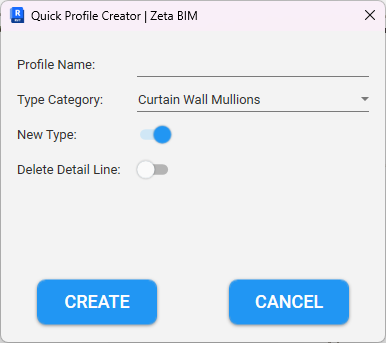
Need a custom mullion, cornice or gutter shape? Quick Profile Creator lets you create Revit profiles straight from detail lines in your project. There is no need to open the Family Editor, save and load.
Why create Revit profiles this way
The usual way takes many steps: draw lines, open a profile template, copy the lines, set the category, save, load and assign the profile to a type. Quick Profile Creator does all of this in one go, so you stay in your model. In addition, it can make the matching type for you.
Before you start
- Open a plan or section view.
- Draw the profile shape with detail lines as a closed outline.
Steps
- Click Quick Profile (Zeta BIM tab › Manager).
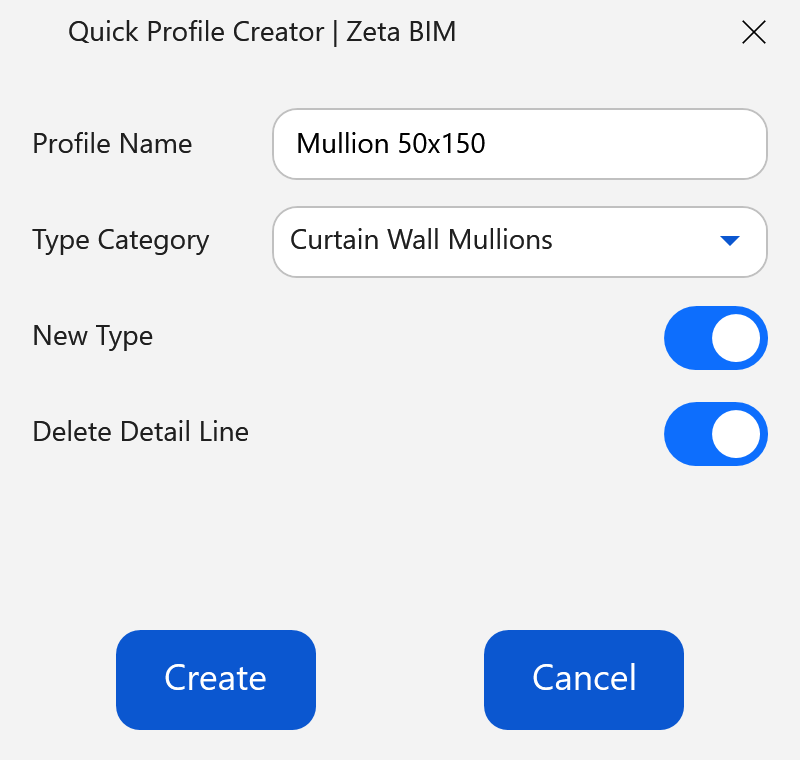
- Enter the Profile Name and choose the Type Category.
- Set New Type and Delete Detail Line (see below), then click Create.
- Select the detail lines of the profile and click Finish.
- Click a point to set the origin of the profile. Place it where the profile should attach, for example the centre of a mullion.
- The profile family is created and loaded into the project.
Options
| Option | What it does |
|---|---|
| Profile Name | Name of the new profile family. It must not exist in the project yet. |
| Type Category | Curtain Wall Mullions, Fascias, Gutters, Slab Edges, Wall Reveals or Wall Sweeps. |
| New Type | On: also creates a type of that category with the same name, using the new profile. For example a new mullion type ready to apply. |
| Delete Detail Line | On: removes the detail lines you selected after the profile is made. |
Good to know
- The tool uses the Revit profile family template. If it cannot be found, a message asks you to reinstall ZetaBIM or the Revit family templates.
- Your last category and options are remembered.
Related
Video
Get ZetaBIM
ZetaBIM is a Revit plugin for scan-to-BIM teams. See the complete guide to the Revit point cloud plugin workflow. Download ZetaBIM to try it, browse more ZetaBIM tutorials, or watch the videos on the ZetaBIM YouTube channel.
About The Author