Your cart is currently empty!
Install in three steps
- Close Revit, then download and unzip the file above.
- Run ZetaBIMSetup.exe. It downloads the latest version of the plugin and installs it for your Revit versions.
- Open Revit, go to the Zeta BIM tab and sign in with your ZetaBIM account under Account.
Windows shows “Windows protected your PC”?
Windows SmartScreen shows this message for new installers it does not know yet. It is not a virus warning. To continue: click More info, check that the file is ZetaBIMSetup.exe downloaded from zetabim.com, then click Run anyway.
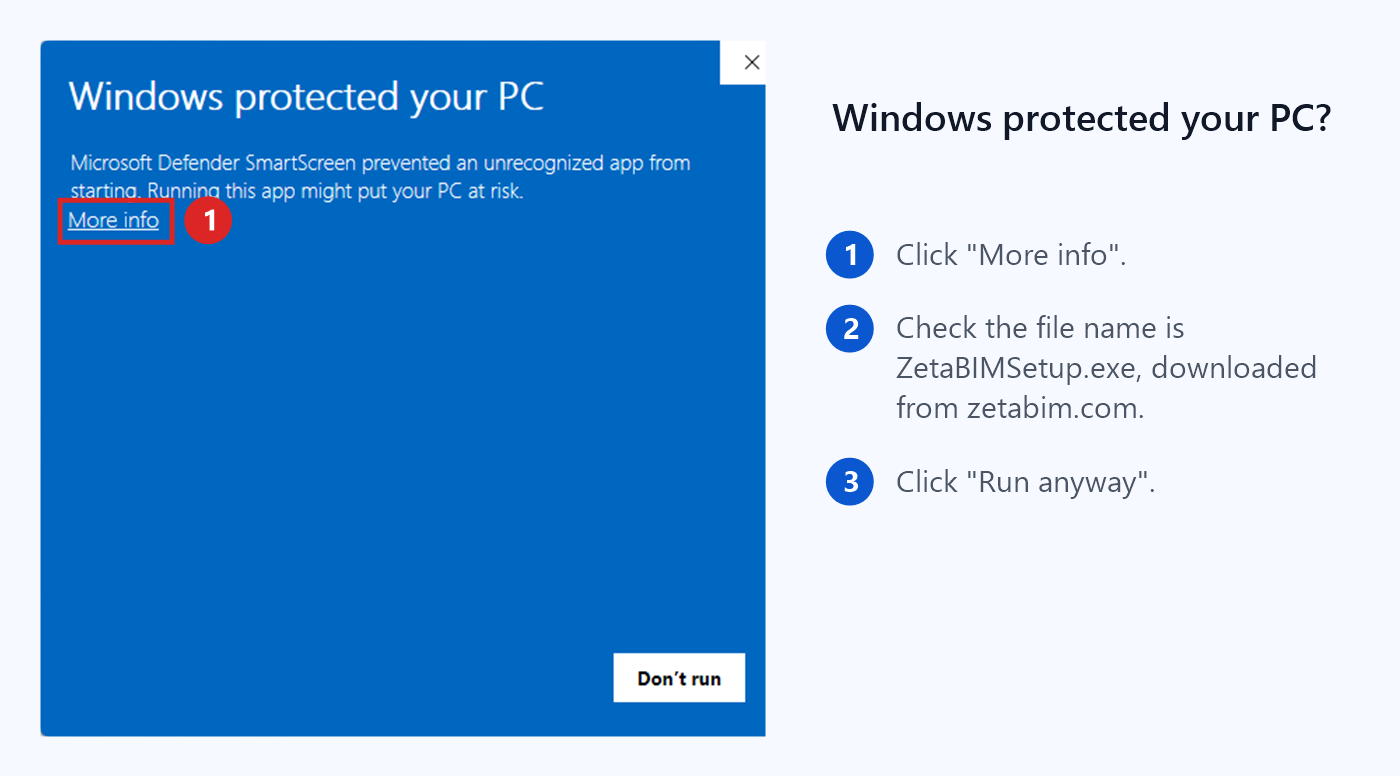
Only run installers downloaded from zetabim.com. Never turn off Windows Defender to install software.
Your first 10 minutes
1. Link your scan
Insert your RCP point cloud and open a 3D view or plan of one area.
2. Click a wall
Open Fit Arch, press Create and click a wall face in the scan.
3. Check it
Run Deviation to see how close the model is to the scan.
Step-by-step guides for every tool are in the Revit point cloud plugin guide and the Tutorial section.
Requirements
- Windows with Autodesk Revit 2021 to 2027 installed.
- Point clouds linked into Revit as RCP/RCS (indexed with Autodesk ReCap).
- An internet connection to sign in and check your license.
14-day trial
ZetaBIM offers a 14-day trial for new users. You can use the plugin on your own projects with no initial commitment, and decide afterwards whether it fits your workflow. When you are ready, choose a plan on the pricing page. License sales are final, so please use the trial first (see our Refund Policy).
Need help?
Something does not work as expected? Contact us or write to info@zetabim.com with a screenshot, and we will get back to you.